Apple Health, delivered to a server you own.
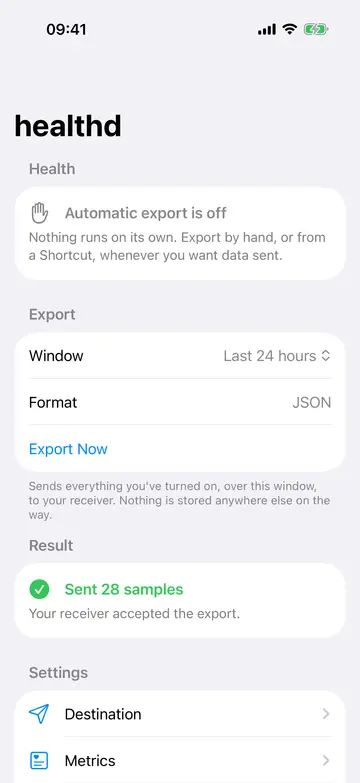
healthd is an iPhone app that sends your steps, heart rate, sleep and workouts from Apple Health straight to an HTTP endpoint you run — Home Assistant, Grafana, a home server, your own scripts. No server of ours in between.
- JSON or CSV
- Retries for up to seven days
- A delivery log on the phone
Beta coming soon
Read the docsRequires iOS 17 or later. No account, no sign-up.
How it works
From Health to your server in three steps.
-
Step 1
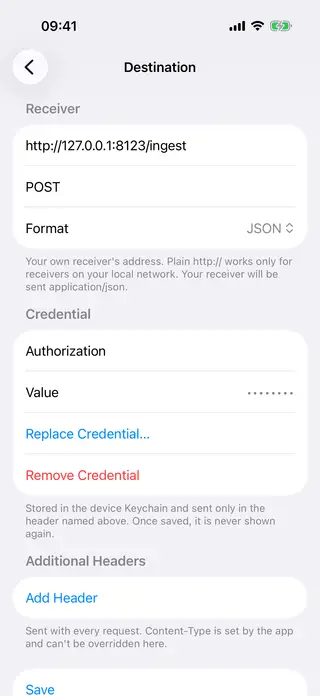
Point it at your receiver
Enter the address, method and headers, including a credential header. Plain HTTP to an IP on your own network works. “Test connection” sends an empty probe to check it.
-
Step 2
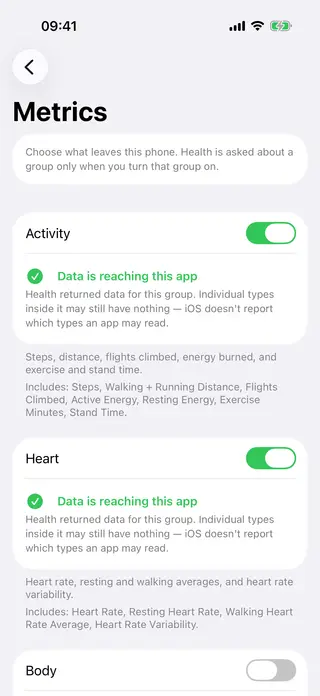
Choose what leaves the phone
Six groups — activity, heart, body, sleep, vitals, workouts. Health access is asked for per group, only when you turn that group on.
-
Step 3
Export
Tap Export Now, run it from a Shortcut, or turn on automatic export and leave it alone.
What you get
Made for people who run their own server.
-
A contract, not a surprise
The JSON payload and the CSV layout are published and frozen at version 1. New keys may appear; none is removed or renamed.
-
A key to deduplicate on
Every sample carries Apple Health’s own
uuid. A retried batch is the same bytes under the sameexportIdandbatchSequence, so an upsert absorbs it. -
Resumes where it left off
Automatic export resumes from a saved position per metric type, so a reading added late with an old date still arrives, and an app kill, a reboot or a dead network does not lose what was waiting to be sent.
-
Retries with backoff
If your receiver is down, a failed batch stays on the phone and is retried from 15 minutes, doubling up to an hour, for up to seven days.
-
A log you can read on the phone
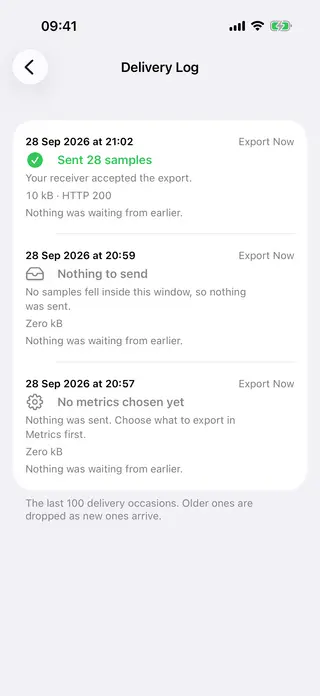
The last 100 runs with time, size, response status and error text, and a verdict on whether the pipeline is healthy right now.
-
It tells you when delivery keeps failing
A local notification after a number of consecutive failed deliveries that you choose.
-
Built for a home network
Before iOS asks for local network access, the app explains why it needs it.
-
Friendly to a default proxy
A batch holds at most 1000 samples and stays under 1 MB, so a stock nginx limit accepts it.
What it does not do
Read this before you build on it.
- It is not real-time. The target is data sent typically within an hour of arriving in Health. iOS decides when the app wakes; that is a target, not a schedule.
- Low Power Mode stops automatic export, and so does swiping the app away in the app switcher. Waiting work is kept; after a swipe-away, nothing is sent until you open the app again.
- Failure alerts need a failed attempt. If iOS stops waking the app, nothing is attempted, so nothing fails — the log is where that shows.
- No charts or dashboard in the app. You build the view in your own tools.
- No deletions. If you delete a sample in Health after it was delivered, your copy keeps it.
- Health is unreadable while the phone is locked. Batches already queued can still go out; new readings wait for an unlock.
- It does not retry forever. Work still pending after seven days is dropped. A
401,404or a redirect is not retried at all. - Apple Health only. No Screen Time, Messages, Notes or other data. No workout GPS routes.
- An iPhone app. There is no Mac, Watch or Vision Pro app.
- One way to deliver: a direct HTTP request to your endpoint. No email, no file sync, no message broker.
Privacy
Your data goes to one place: yours.
- There is no server behind this app. Your endpoint is the only place your data goes.
- No account, no login, nothing to sign up for.
- No health data is stored in iCloud.
- The app never reads your receiver’s response body — only the status code.
- Your endpoint credential is masked once saved and kept out of logs; the delivery log holds no health data.
- Data waiting on the phone stays unreadable until the phone has been unlocked once since it started.
- This website loads no scripts, no trackers and no third-party fonts.
FAQ
What do I need on the receiving end?
Anything that accepts an HTTP request and answers with a 2xx status. The docs have
the full payload and a minimal receiver.
Will my receiver get duplicates?
The app does not send the same record twice, with one exception: if a send succeeds but the app
is killed before recording it, the same bytes are sent again. Manual and Shortcut exports over
overlapping time ranges also resend the overlap by design. A receiver that upserts on uuid absorbs all of it.
What happens if my server is down for a while?
The batch stays queued and is retried with backoff until it gets a 2xx, for up to seven days. After that it is dropped, and the only way back is a manual export over the
missing range.
Which data can it send?
Steps, distance, energy, heart rate and HRV, body measurements, sleep stages, blood oxygen, respiratory rate, VO2 max, body temperature, blood pressure, and workouts — 24 types in six groups.
Can I trigger it on my own schedule?
Yes. The Shortcuts action “Export Health Data” exports the last 3 hours, 24 hours, 7 days or 30 days, and throws a readable error when it fails.
Can an LLM build my dashboard?
That is what the LLM edition is for: one file a model can read to build a receiver and a dashboard, including what the app cannot do.
Your health data. Your server.
Beta coming soon
Read the docs